Appointments for every doctor, every clinic — in one live view
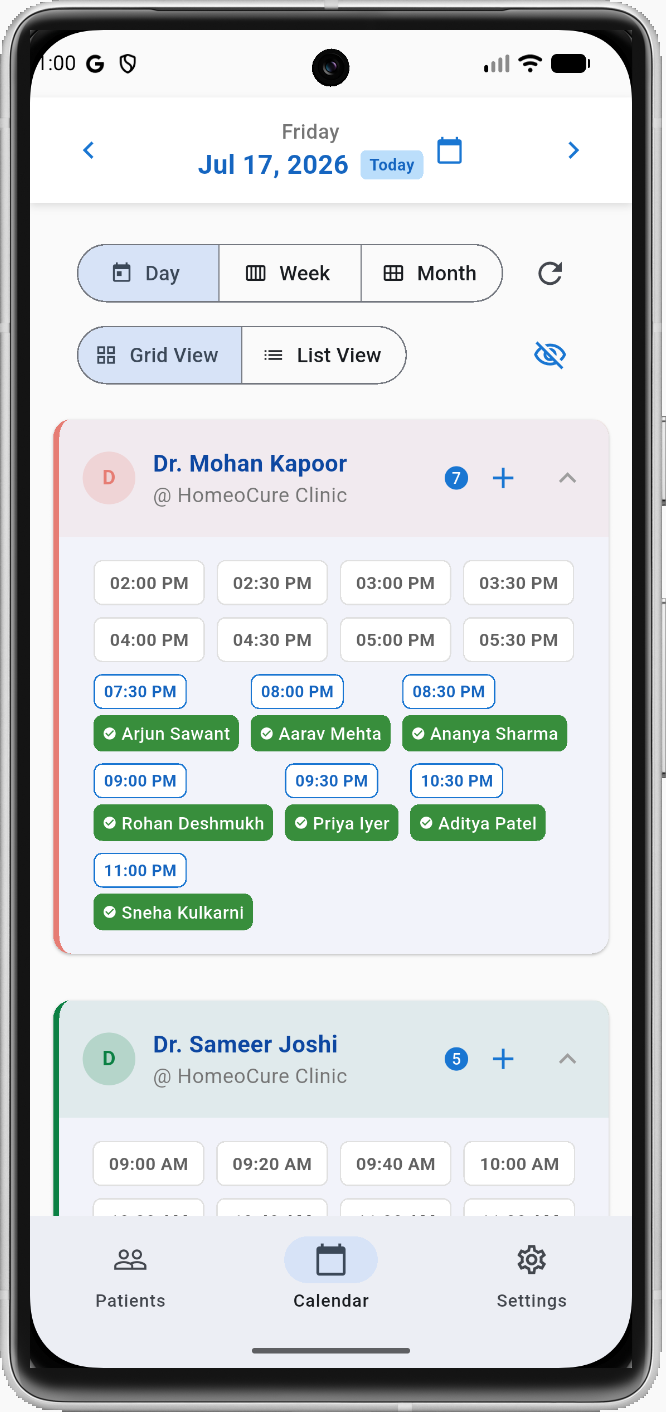
The calendar is the first screen your receptionist sees every morning. CaseIndex shows one card per schedule — each doctor at each clinic — with all their time slots for the day. Every device shows the same live data, updated the instant anything changes.
- Day grid view: one card per schedule, time slots as chips, patient name shown on each booked slot
- List view: chronological list of all appointments with more detail per booking
- Week and month views: booking counts per doctor or per clinic, tap any day to drill down
- Real-time sync: Firebase push updates every open screen the instant a booking changes
- Cache-first loading: calendar renders from local cache instantly; works on slow or patchy connections
- Adjacent-day preloading: nearby dates load in the background for instant navigation
- Hide off-duty toggle: collapse schedule cards for doctors not working that day
- Date picker: jump to any date directly
Booking options
Quick Book
Enter patient name and phone number directly from the slot. No need to find the patient record first — fast for walk-ins.
Search & Link Patient
Search existing patients and link the booking to their record. Visit history and files become accessible from the appointment.
Overtime Booking
Book appointments outside the configured shift hours for a doctor. Handles walk-ins and late additions without friction.
Reschedule
Move an appointment to a different date and time. Patient gets a WhatsApp update automatically if the option is enabled.
Record vitals and notes during the consultation — on your phone
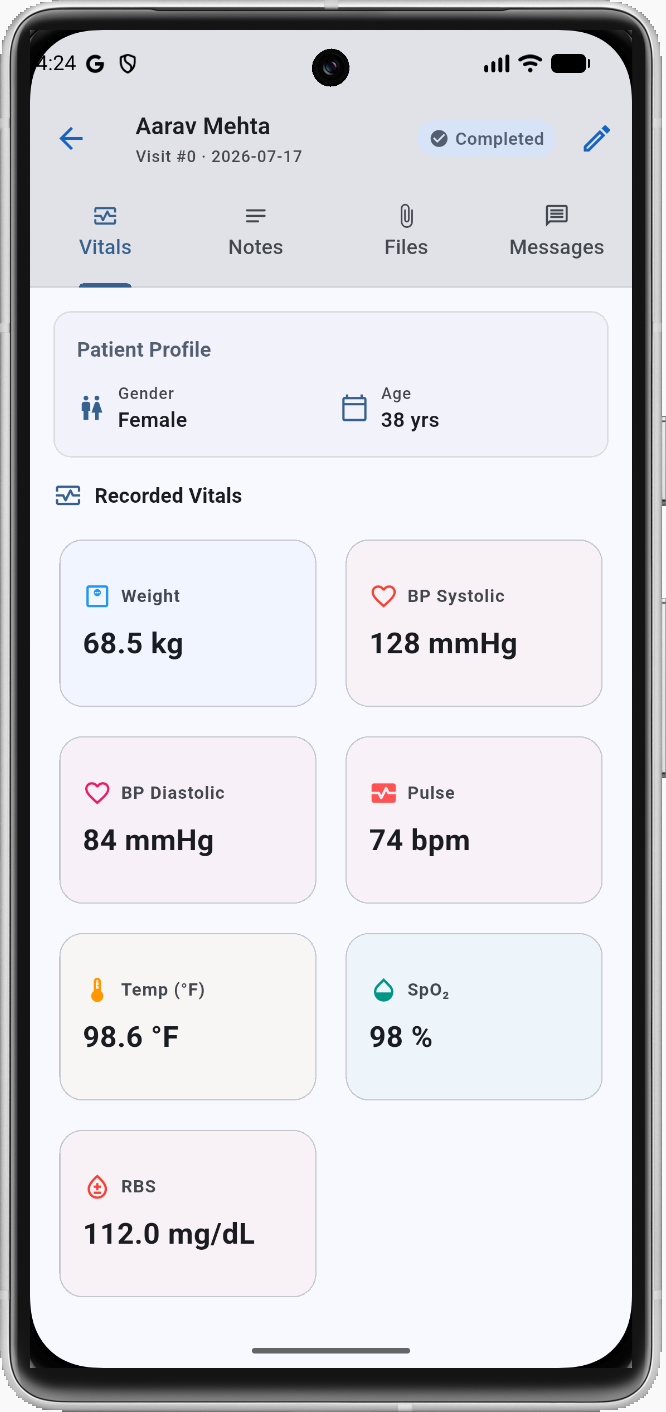
Each appointment links to a visit record on your phone. Open it, switch to the Vitals tab, and start entering — all while the patient is sitting in front of you. CaseIndex auto-saves as you type so nothing is lost if you get interrupted.
- Vitals tab: 18 parameters including BP, SpO₂, Temperature, Pulse, Weight, BMI, RBS/FBS/PPBS, HbA1c, Pain Score, and more
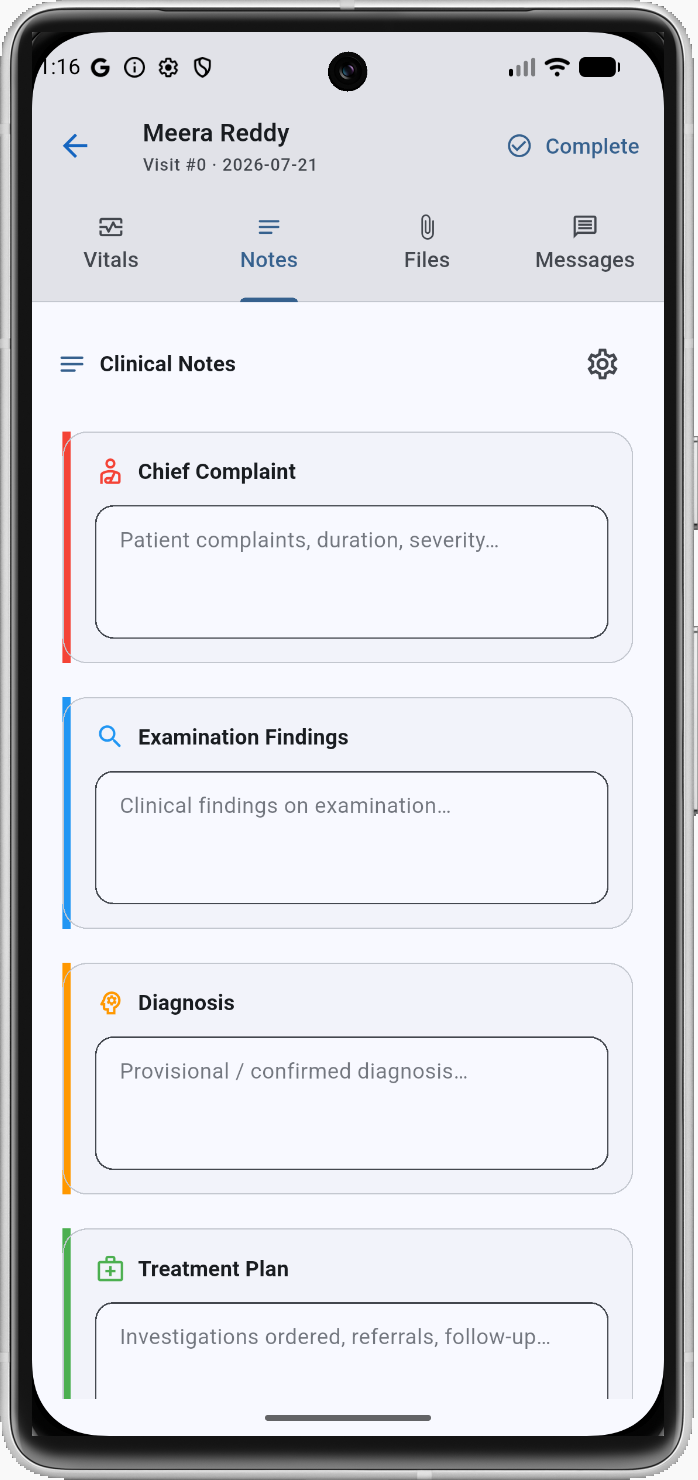
- Notes tab: structured fields for Chief Complaint, History, Examination Findings, Diagnosis, Treatment Plan, and free-text notes
- Per-doctor template: cardiologist and pediatrician see different forms. Each doctor configures exactly which vitals and note fields appear
- Auto-save: saves in the background every few seconds as you type and when you switch tabs
- Version protection: alerts if another device saved a newer version of the visit to prevent overwriting
- Visit lifecycle: track visits through In Progress and Completed states; completed visits remain re-editable
- Saved to Google Docs: visit notes are automatically saved as a Google Doc, readable from any web browser
- Follow-up scheduling: set a target follow-up date during the visit to automatically queue a WhatsApp reminder on that day
Structured clinical notes
The Notes tab gives you well-defined sections — not a blank text box. Chief Complaint, History, Examination Findings, Diagnosis, and Treatment Plan are all separate fields so records stay organized across visits.
- Each field is saved independently
- Free-text notes field for anything that doesn't fit the standard structure
- Readable in Google Docs even without the application open
Find any patient in seconds. Act in one tap.
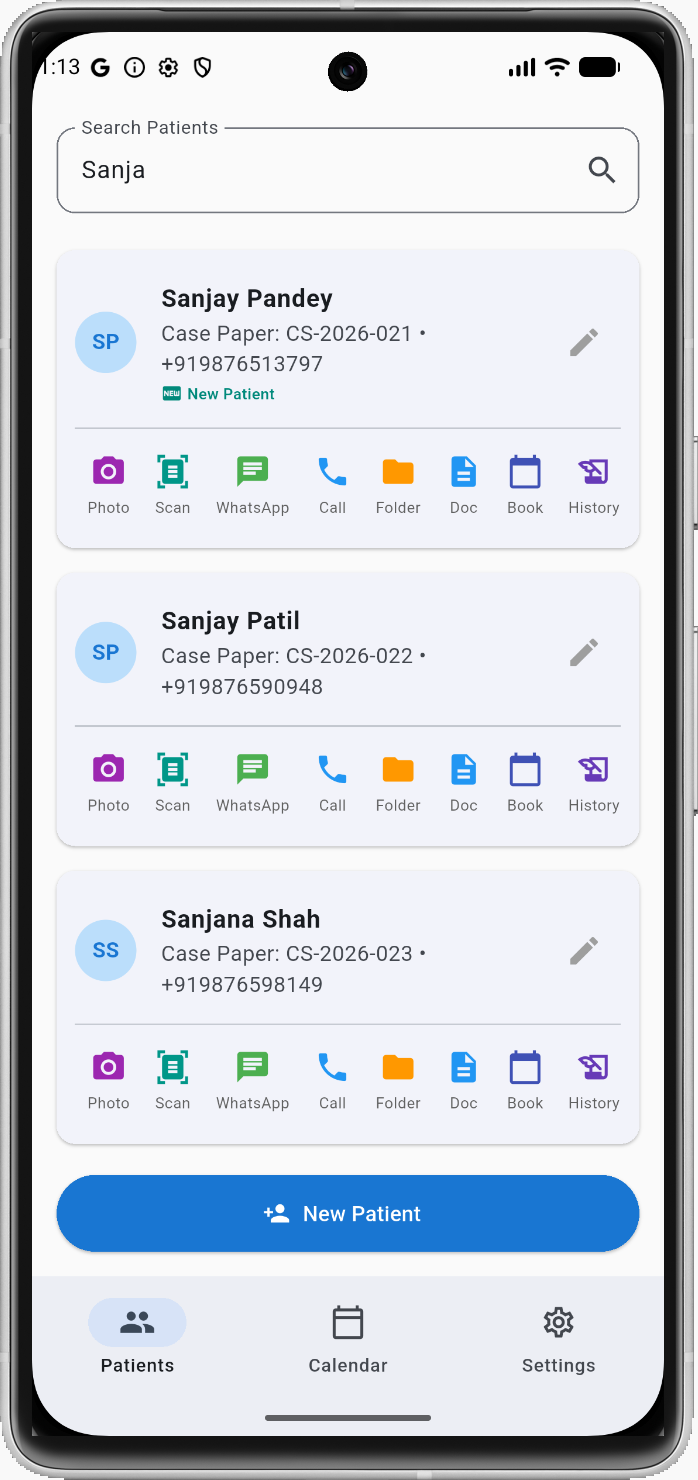
The patient screen is your clinic's front desk — fast search, complete profile, and a row of action buttons that put every common task one tap away. No menus to navigate.
- Instant search: find any patient record instantly by name or mobile number
- Patient profile: tracks name, mobile, gender, date of birth / age, email, address, and special patient notes
- Auto-generated patient ID: sequential reference number assigned automatically on registration
- Last visit indicator: highlights "New Patient" or lists the date of their last visit at a glance
- Quick-action bar: Photo, Scan, WhatsApp, Call, Drive Folder, Case Doc, Book Appointment, History, and Review Request
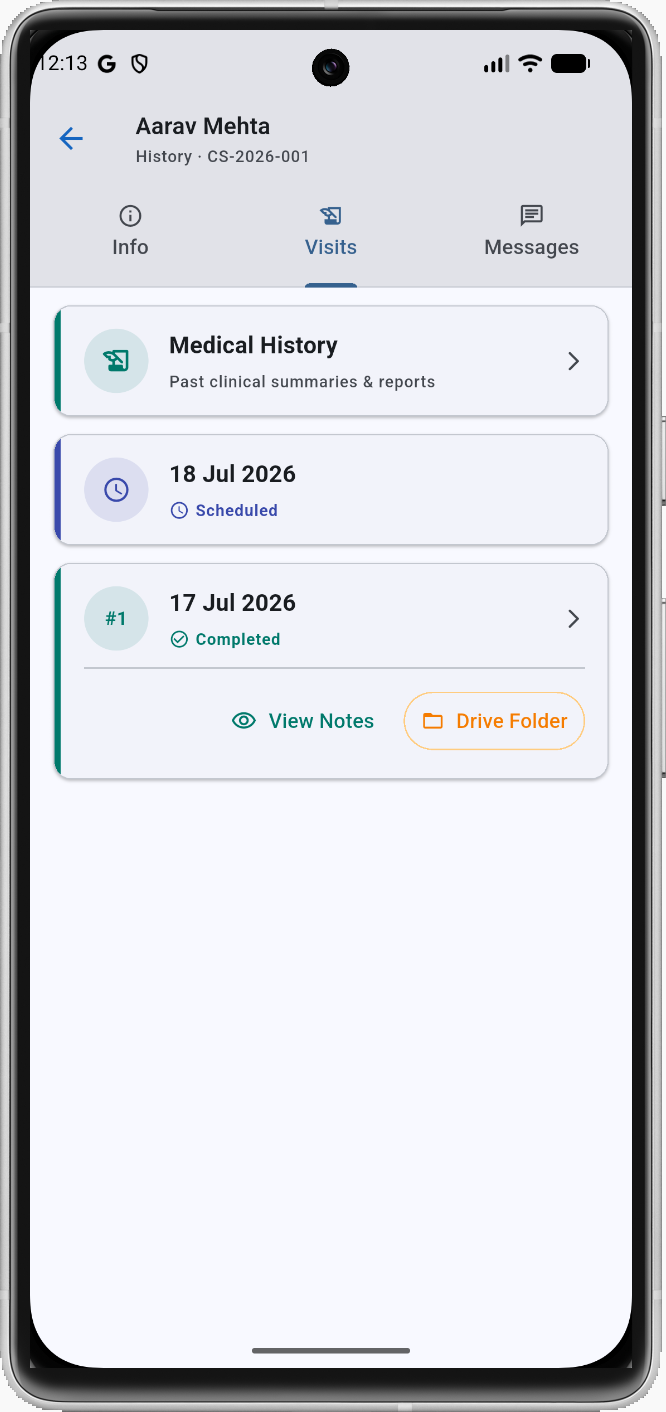
- Patient timeline: Info, Visits, and Messages tabs provide a comprehensive history of the patient
- Medical history: baseline clinical summary (allergies, chronic issues, active medications) separate from daily visit logs
Scan, photograph, and upload — all from your phone
Every patient gets a Google Drive folder. Scan old prescriptions, photograph X-rays on a light box, annotate images, or upload existing PDFs — all from the same screen. Files are attached to a specific visit or to the patient's baseline medical history.
- Document scanner: powered by Google ML Kit; scans reports into clean PDFs or JPGs with auto perspective correction
- Camera with annotation: capture physical records and draw or write annotations on them before uploading
- File picker: upload existing PDF reports, images, or files directly from your phone's storage
- Auto-upload to Google Drive: files are organized in the patient's own Google Drive folder automatically
- Tag to visit or history: attach reports to a specific visit record or save them as baseline medical history
- One-tap view in Drive: access and review any stored patient document instantly within the app
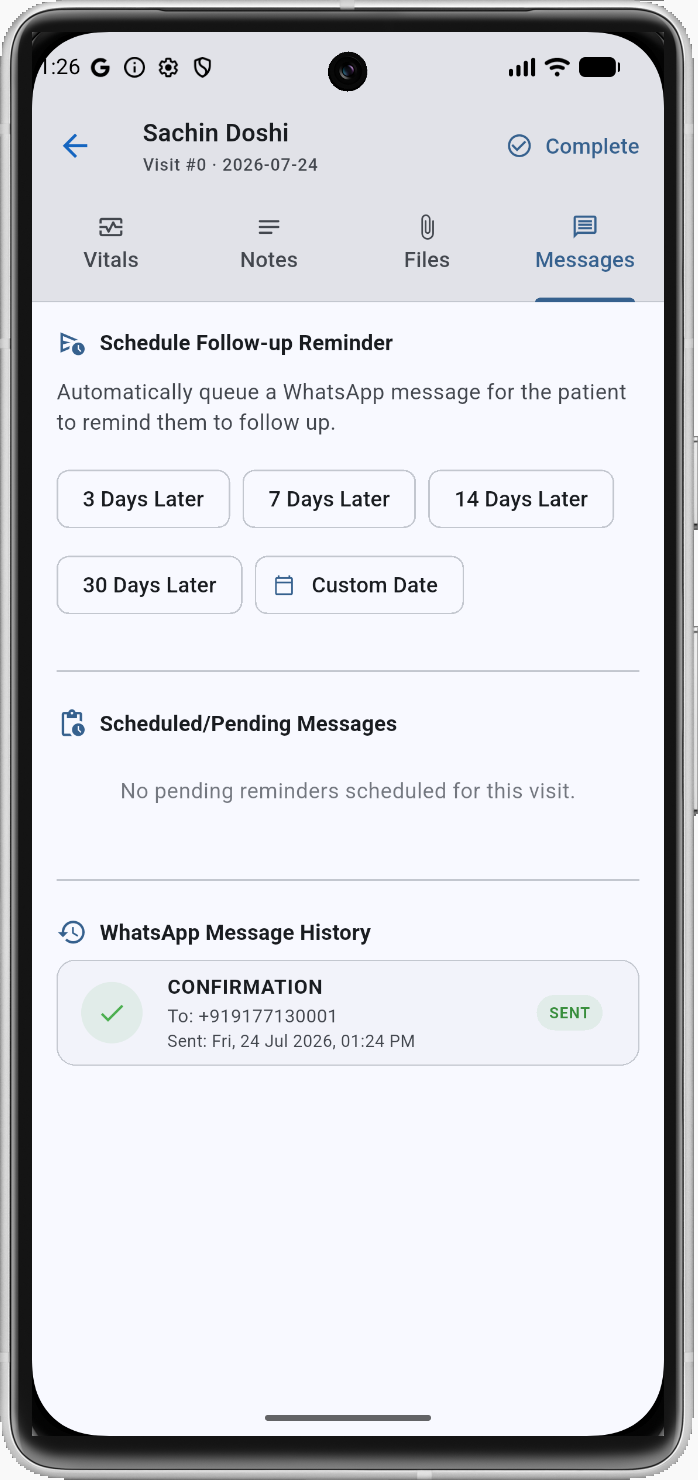
WhatsApp built-in — India's real communication channel
Email goes unread. SMS gets ignored. In India, WhatsApp is where patients actually respond. CaseIndex has WhatsApp workflows built directly into every step of the patient journey — no API contract, no third-party service to pay for.
- Booking confirmations: sent automatically when an appointment is scheduled. Can be toggled on or off per booking
- Appointment reminders: automatic reminders sent before scheduled slots to reduce no-shows
- Doctor-to-patient messaging: open WhatsApp with pre-filled clinical templates directly from the patient profile
- Google Review requests: boost your clinic reputation by sending review link requests in one tap
- Message log: track the history of WhatsApp communications sent to each patient
- Follow-up recalls: automatically dispatch a scheduled WhatsApp message reminding patients when they are due for their next follow-up consult
Let patients book themselves — 24/7
Share a booking link, or embed a widget on your clinic website with a single line of code. Patients pick their doctor, see genuinely available slots in real time, and confirm — you get notified instantly, and a WhatsApp confirmation goes to the patient automatically.
- Shareable booking link: copy your direct booking link for WhatsApp messages or social media profiles
- Embeddable widget: drop a simple script tag onto your existing website to add patient self-booking
- Real-time availability: displays only genuinely free slots directly from the doctor's calendar
- Doctor and clinic selection: allows patients to choose their specific doctor and clinic location
- Instant WhatsApp confirmation: automatically confirms the slot with the patient via WhatsApp
- Google Ads conversion tracking: records online self-bookings directly and automatically in your Google Ads account
- reCAPTCHA protection: built-in spam protection prevents automated bot bookings
Book an Appointment
Protected by reCAPTCHA · Confirmation sent via WhatsApp
Patient records in your Google account — not ours
CaseIndex uses your own Google Workspace account to store appointments, files, and case documents. You have full ownership. If you ever stop using CaseIndex, every record is still right there in your Google account — nothing to export, nothing to lose.
- Google Drive folder per patient: automatically created on registration to store patient reports and files
- Google Docs case records: visit notes are saved as text documents, accessible from any browser without the app
- Google Calendar sync: syncs clinic appointments directly into your own calendar events
- Google Sheets booking log: booking details are auto-logged for practice analytics and conversion tracking
- No vendor lock-in: you retain complete ownership of all records in standard Google file formats
- Access from any device: retrieve your clinic data securely on phone, tablet, or computer
Know which ad campaign brought in each patient
If you run Google Ads to attract new patients, CaseIndex closes the loop between ad clicks and real consultations. The online booking widget records conversions directly in your Google Ads account. For patients who click your ads but book later via phone, WhatsApp, or walking in, CaseIndex logs offline conversion data automatically so you can attribute them correctly.
- Direct online conversions: the public booking widget automatically registers a conversion event in your Google Ads account the instant a patient self-books a slot online
- Offline conversion logging: for patients who visit your site via ads but book later via phone, WhatsApp, or walk-in, CaseIndex auto-logs their click identifier (GCLID) and booking details to Google Sheets for easy offline import
- No third-party tools: works natively with standard Google Ads tags and Google Sheets without requiring expensive attribution platforms
- Google Review collection: send automated review request links via WhatsApp to boost your Google Maps ranking and organic discovery
Set it up once, run it your way
CaseIndex is configured around your actual practice — your clinics, your doctors, your shift timings, and your visit templates. Everything is editable from the Settings screen.
Clinics
Add multiple clinic locations with name, address, and Google Maps link. Each clinic can have its own schedule and doctors.
Doctors
Add doctors with name, specialty, and a color for the calendar. Each doctor independently configures their visit template (which vitals and notes appear).
Schedules
Define weekly shift rules per doctor per clinic — which days they work, start and end times, and slot duration (15, 20, 30, 60 minutes, etc.).
Staff & Roles
Invite staff with role-based access: Owner, Doctor, or Receptionist. Each role sees and can do only what's appropriate.
Integrations
Connect your Google Account. CaseIndex shows connection status for Calendar, Drive, and authentication.
General & Booking Settings
Business name, time format (12h/24h), booking window (how many days ahead patients can book), patient ID format, and WhatsApp message templates.
Ready to see it in action?
14 days, every feature, no credit card. Takes 15 minutes to set up.